Wrangling Academic Author Profiles: ORCID, Semantic Scholar, OpenAlex, Google Scholar, and DBLP
After starting a PhD, it became obvious that a clean, disambiguated academic identity matters almost as much as the papers themselves. Resumes, submission systems, and citation checks kept running into the same mess: name collisions, preprint vs. conference versions that did not line up, and paper lists that disagreed across platforms. I spent about two days registering, claiming, and cleaning the usual stack.
This post follows the order I actually used.
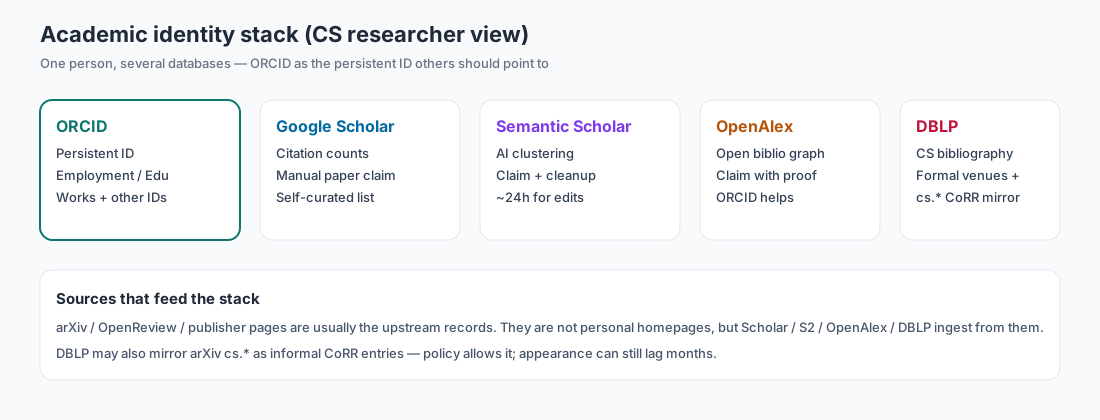
What each platform is for
Do not expect one site to cover everything:
| Platform | Role | How I use it |
|---|---|---|
| ORCID | Persistent researcher ID | Primary profile: affiliation, education, works, and outbound IDs should converge here |
| Google Scholar | Citations and visibility | Claim your papers and track citations |
| Semantic Scholar | AI index + author page | Claim required; auto-clustering often mixes in other people’s papers — clean by hand |
| OpenAlex | Open bibliographic graph | Claim for corrections and open-data hooks |
| DBLP | CS bibliography | Indexes formal CS venues; also mirrors some arXiv cs.* papers as CoRR (with lag) |
| arXiv / OpenReview | Upstream sources | Not personal homepages, but most of the stack ingests from them |
Public short links I keep now (for cross-checking):
- ORCID: https://orcid.org/0009-0008-7780-3449
- Google Scholar: https://scholar.google.com/citations?user=MFgrZKwAAAAJ&hl=en
- Semantic Scholar: https://www.semanticscholar.org/author/2295277669
- OpenAlex: https://openalex.org/A5133614168
- DBLP: no author page yet (see Step 5)
Step 1: ORCID first (the foundation)
- Register at orcid.org and set profile visibility appropriately.
- Employment: current PhD / research position.
- Education: fill in your actual stages.
- Biography: state research interests clearly (e.g. LLM agents, self-evolving agents, tool learning).
- Works: auto-import is useful.
- Add Google Scholar, OpenAlex, Semantic Scholar, etc. under other identifiers so people can jump out from ORCID.
A solid ORCID makes later Semantic Scholar / OpenAlex claims much cheaper to justify.
Step 2: Google Scholar (My Citations)
- Create an author profile with a Google account.
- Fill in name, affiliation, and research interests.
- Verify with your institutional email.
- Add papers yourself via Add articles or Add article groups: search by title / name / keywords and add what is yours (Google Scholar Profiles help).
Scholar is mostly a citation dashboard; the paper list starts from what you add.
Step 3: Claim Semantic Scholar
- Open semanticscholar.org and search your name (or jump in from a known paper title).
- On the auto-generated author page, click Claim Author Page.
- Fill the form: affiliation, homepage, ORCID, and similar support (using an email that appears on your papers usually helps review).
- After approval, use Remove Papers for obvious false matches.
- Important (also in their FAQ): paper/profile edits are not instant. Wait about 24 hours before refreshing; if nothing changed yet, do not spam resubmit.
Auto author clustering is weak on common names. Cleanup often takes longer than the claim click itself.
Step 4: Claim OpenAlex
- Open openalex.org, search your name, and find the auto-generated author record (mine looks like
A5133614168). - Sign in / register and claim.
- Provide public proof of identity — typically an institutional page or a public ORCID, not a dump of every paper URL. In my case, pasting a public ORCID was enough and the claim went through right away.
OpenAlex leans open data and APIs. Claiming makes later corrections and ORCID linking easier.
Step 5: DBLP
DBLP is the main CS bibliography people expect on CVs. Two practical points:
- There is no Scholar-style “open an account and claim my page” flow. An author page appears after DBLP has indexed work under your name.
- Per the DBLP FAQ on arXiv, papers in arXiv
cs.*categories (e.g.cs.AI) can be mirrored as informal CoRR entries. That is policy, not a guarantee of fast appearance — and DBLP does not offer a personal claim button while you wait.
My case matches the lag story: UniToolCall is cs.AI (posted Apr 2026), but as of this writing it still does not show up in a usable DBLP author page for me. So I treat DBLP as “wait for ingest / formal venue,” not something I can force today.
Takeaways
Registering accounts is the easy part. The real work is cleaning machine false matches (especially Semantic Scholar) and keeping ORCID as the hub with every other ID cross-linked.
After each acceptance or formal publication, spend a few minutes updating Scholar / S2 / OpenAlex / ORCID (and DBLP later). That beats one giant cleanup before graduation.